
AI Image Generator in CorelDRAW: Create Stunning AI Photos
Transform your imagination into stunning AI photos and artwork instantly with the AI image generator in CorelDRAW. Just type a creative prompt and watch as original visuals appear in seconds. Perfe...
CORELDRAW GO TUTORIAL
10 min read
CorelDRAW AI Image Generator
Turn your imagination into stunning original AI Photos or Artwork instantly with AI Image Generator in CorelDRAW. Just type a creative text prompt like “futuristic city at sunset” or “luxury coffee shop watercolor illustration,” and watch original AI-generated visuals appear in seconds. No drawing skills or expensive design tools required. Explore endless artistic styles, experiment with fresh ideas, and create eye-catching graphics for social media, branding, presentations, posters, and marketing campaigns with incredible ease. CorelDRAW combines powerful AI creativity with intuitive design tools, helping beginners and professionals design faster than ever. Describe it, generate it, customize it, and bring your imagination to life instantly with CorelDRAW.
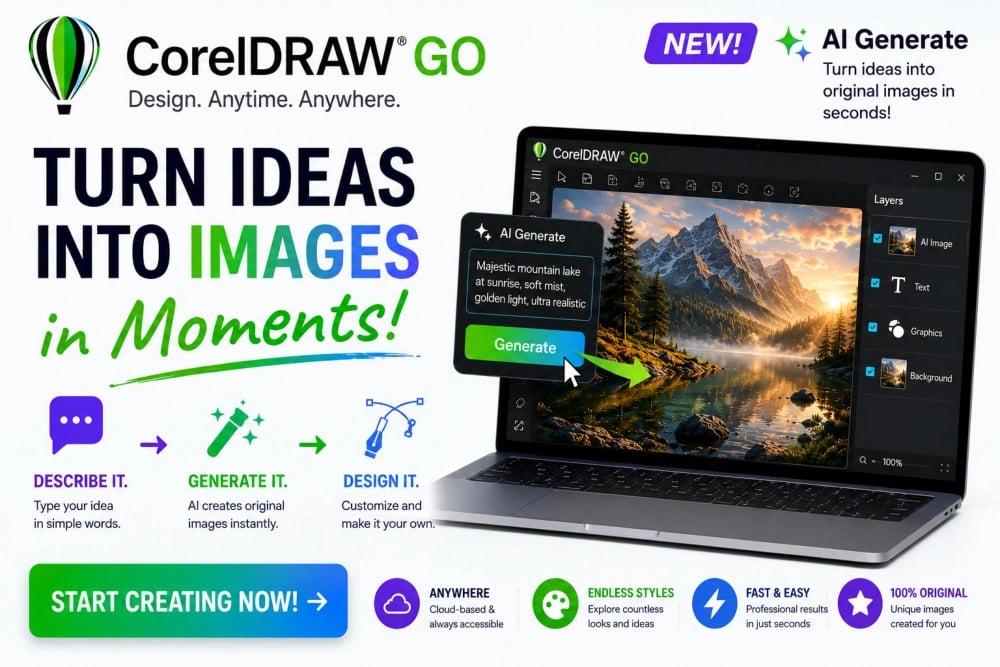

Turn Ideas into AI Photos in Seconds with AI Image Generator in CorelDRAW Go
Creativity often begins with a rough idea floating in your mind. Maybe you picture a futuristic city, a dreamy travel poster, a colorful business logo, or a fantasy landscape for a social media campaign. In traditional design workflows, turning those thoughts into visuals could take hours of sketching, searching for stock images, or learning complicated illustration techniques. With AI Image Generator inside CorelDRAW Go, those barriers disappear. You describe your idea using text prompts, and the software instantly transforms your words into original AI Photos. A beginner can now create professional-looking AI Photos and Artwork without advanced drawing skills. For example, a café owner could type “cozy coffee shop with warm lights and rainy window in watercolor style,” and within moments receive inspiring artwork ready for menus or promotions. This changes the creative process completely because inspiration no longer gets trapped inside your imagination. CorelDRAW Go turns ideas into visible concepts like AI Photos and Artwork almost instantly, helping creators move from thinking to designing faster than ever before.
How AI Image Generator Works in CorelDRAW
AI Image Generator in CorelDRAW Go works like a creative assistant that understands descriptive language. Instead of manually drawing every object, users provide prompts explaining what they want to see. The AI studies the description and produces entirely new visuals based on the request. This process feels natural because it works almost like having a conversation with a digital artist. A novice designer can start creating AI Photos in CorelDRAW with simple prompts and gradually experiment with more detailed instructions. For example, typing “modern mountain cabin at sunset with cinematic lighting” may generate several artistic AI Photo and Artwork variations within seconds. You can then choose the best image, refine it further, or combine elements from multiple results. The beauty of the system is its accessibility. Even users with zero illustration experience can produce artwork suitable for blogs, presentations, advertisements, posters, or social media graphics. CorelDRAW Go removes technical fear and replaces it with creative excitement, allowing users to focus more on ideas and storytelling rather than struggling with difficult design tools.
Starting Your First AI Photo Project
Getting started with AI Photo and Artwork feels surprisingly simple, even for someone completely new to graphic design. After opening CorelDRAW Go, users can access the AI Generate feature and begin typing creative prompts directly into the workspace. The secret is describing the scene clearly and naturally. Instead of using one-word instructions, explain the mood, colors, setting, and style. For example, a beginner designing a travel poster might type “tropical beach with turquoise water, palm trees, golden sunset, realistic style.” The AI Image Generator in CorelDRAW will then create multiple AI Photo interpretations based on those instructions. Users can instantly compare options and select the image that best matches their vision. This immediate feedback encourages experimentation because there is no penalty for trying new ideas. Someone designing a birthday invitation could test cartoon styles, watercolor effects, or realistic photography-inspired looks in minutes. The process feels playful and inspiring rather than intimidating, making CorelDRAW Go an excellent creative companion for students, entrepreneurs, hobbyists, and professional designers alike.
Writing Better Prompts for AI Image Generator
The quality of AI Photos artwork depends heavily on the prompts you provide. Fortunately, learning prompt writing inside CorelDRAW Go is easy and enjoyable. Think of prompts as creative instructions guiding the AI image generator toward realizing your vision. Short prompts may produce interesting results, but detailed prompts usually create richer and more accurate visuals. For instance, instead of typing “dog,” try “golden retriever puppy wearing sunglasses on a skateboard in a colorful urban street, cartoon style.” The second prompt gives the AI image generator in CorelDRAW much more information to interpret. Beginners quickly discover how adding details like lighting, mood, textures, camera angle, or art style dramatically improves the AI Photo output. A small business owner creating product ads might experiment with “luxury perfume bottle on black marble surface with dramatic lighting.” This produces sophisticated promotional AI photos without expensive photography sessions. Prompt experimentation becomes part of the creative fun. CorelDRAW Go encourages users to refine ideas continuously until the AI-generated image perfectly matches their imagination and branding goals.
Exploring Artistic Styles in AI Photos with Ease
One of the most exciting features of the AI image generator in CorelDRAW Go is the ability to experiment with different artistic styles instantly. Traditionally, creating artwork in multiple styles required years of practice or hiring different illustrators. Now, beginners can explore countless visual directions in minutes. You can transform the same idea into watercolor art, comic illustrations, realistic AI Photos, cyberpunk scenes, oil paintings, minimal vector graphics, or fantasy artwork simply by changing the prompt. Imagine designing a music event poster. A user could first generate retro neon-style AI Photos, then switch to a grunge rock aesthetic, and later test a sleek futuristic look without starting from scratch. This freedom encourages creativity because users are not locked into a single artistic direction. For example, a YouTube creator designing channel art might explore anime-inspired AI Photo or Artwork one moment and cinematic fantasy AI Photo in the next. CorelDRAW AI Image Generator makes creative exploration effortless, helping users discover unexpected visual possibilities that spark inspiration and produce more original design outcomes.
Creating AI Photos for Social Media Faster
Modern social media demands fresh visual content constantly, and AI Image Generator inside CorelDRAW Go helps creators keep up with that pressure effortlessly. Instead of spending hours searching for stock photos or editing complex graphics, users can instantly generate custom AI Photos tailored to specific campaigns. A fitness coach promoting a new workout plan could type “energetic athlete training in neon gym with motivational atmosphere” and receive attention-grabbing graphics within seconds. Since the visuals are original, brands can stand out instead of recycling overused stock imagery. Social media managers can quickly create themed posts for holidays, seasonal promotions, or product launches. A bakery owner, for example, might generate “fresh strawberry cake with pastel background and elegant lighting” for an Instagram advertisement. The speed of AI image generation makes content creation more efficient while maintaining creativity and originality. CorelDRAW Go becomes especially valuable for small businesses and solo creators who need professional-quality graphics regularly but lack large budgets or dedicated design teams to produce constant visual content. This is where AI Photos comes in handy.
Bringing Business Ideas to Life Using AI Image Generator
Entrepreneurs often struggle to explain ideas clearly because concepts are easier to imagine than describe. AI Image Generator in CorelDRAW Go helps bridge that gap by turning business concepts into immediate visuals. Whether designing product mockups, branding concepts, packaging ideas, or advertising campaigns, users can quickly visualize possibilities without hiring photographers or illustrators. Imagine a startup founder planning a healthy energy drink brand. By typing “modern eco-friendly energy drink can with tropical fruit branding and minimalist design,” the CorelDRAW AI Image Generator can create inspiration for labels and promotional materials instantly. These AI Photos and Artwork help entrepreneurs present ideas more effectively to clients, investors, or marketing teams. The ability to rapidly test visual concepts also accelerates decision-making. Instead of debating abstract descriptions, teams can evaluate actual AI Photos that AI Image Generator has created in CorelDRAW. A clothing brand owner could explore logo styles, photoshoot themes, or fashion campaign aesthetics in minutes. CorelDRAW Go transforms creative brainstorming into AI Photos, making it easier for businesses to communicate ideas professionally and confidently while saving significant time and production costs.
Combining AI Photos with CorelDRAW Tools
AI Image Generator becomes even more powerful when combined with the editing capabilities of CorelDRAW Go. Once an image is generated, users can customize it further using CorelDRAW design tools. This means AI PHotos are not the final destination but the starting point for personalized creativity. A beginner designing a restaurant flyer might generate a delicious pasta image AI Photo, and then add stylish typography, logos, pricing information, and decorative elements directly inside the same workspace. Designers can crop, resize, adjust colors, layer graphics, or combine multiple AI-generated visuals into one polished composition. For example, a travel blogger could create a fantasy-style mountain background and overlay text, icons, and branding to produce a professional YouTube thumbnail. This seamless workflow eliminates the need to jump between multiple applications. CorelDRAW Go simplifies the entire creative process into one integrated environment where inspiration, AI image generation, editing, and final publishing work together seemlessly, allowing users to move from concept to completed design with incredible efficiency and creative freedom.
Using AI Image Generator in CorelDRAW for Creative Learning
AI Image Generator is not only a productivity tool but also a fantastic learning experience for beginners exploring design for the first time. Inside CorelDRAW Go, users naturally begin understanding concepts like composition, lighting, color harmony, texture, and artistic styles simply by experimenting with prompts. A student learning graphic design might compare prompts like “minimal modern logo” versus “vintage hand-drawn logo” and instantly see how AI Photos and its styles influence visual communication. This visual feedback accelerates learning much faster than reading theory alone. Teachers and creative trainers can also use AI Image Generator in CorelDRAW to demonstrate design concepts interactively. For example, an instructor could show how adding terms like “soft lighting,” “dramatic shadows,” or “wide-angle perspective” changes the final image dramatically. Beginners gain confidence because they can produce impressive AI Photos immediately while gradually improving their creative direction. Instead of feeling overwhelmed by technical complexity, users stay motivated through experimentation and discovery. CorelDRAW Go transforms design education into an engaging, hands-on experience where creativity grows naturally through playful exploration and instant visual results.
Creating Unique Marketing Campaigns
Originality matters more than ever in modern advertising, and the AI Image Generator in CorelDRAW Go gives marketers a major creative advantage. Instead of relying on generic templates or overused stock imagery, brands can create AI Photos and visuals tailored specifically to their campaigns. A travel agency launching a winter holiday promotion might generate “luxury snowy mountain resort with glowing cabins and festive atmosphere” to create captivating promotional graphics. Because the images are generated from custom prompts, campaigns feel fresh and distinctive. Marketing teams can rapidly test multiple concepts before finalizing a direction. For example, an online fashion store could compare futuristic themes, retro aesthetics, and luxury editorial styles in a single afternoon. This flexibility allows faster creative decision-making and more engaging brand storytelling. Small businesses especially benefit because they gain access to high-quality AI Photos and visual production without expensive photography studios or illustration budgets. AI Image Generator in CorelDRAW Go empowers marketers to create emotionally engaging visuals quickly, helping advertisements feel more imaginative, polished, and visually memorable across websites, social media, email campaigns, and print promotions.
Overcoming Creative Blocks Instantly
Every creative person experiences moments when ideas simply refuse to flow. AI Image Generator inside CorelDRAW Go acts like an instant inspiration engine during those frustrating situations. Instead of staring at a blank screen, users can type rough concepts and watch new, polished AI Photos appear within seconds. A designer struggling with poster concepts for a music festival might try prompts like “electric neon concert stage with futuristic crowd atmosphere” or “retro vinyl-inspired jazz festival artwork.” Even if the first results are imperfect, they often spark new directions and creative possibilities. Writers, marketers, artists, and entrepreneurs can all use AI Photos as brainstorming tools. For example, a children’s book author could generate fantasy forest scenes to inspire story ideas and character designs. This rapid visualization process keeps creative momentum alive and reduces frustration dramatically. Rather than waiting for inspiration to arrive naturally, users can actively generate visual stimulation whenever needed. AI Image Generator in CorelDRAW Go transforms creative blocks into opportunities for experimentation, discovery, and fresh artistic exploration that can lead to surprisingly original outcomes.
Designing Personalized Content for Clients
Freelancers and creative professionals often need to produce customized visuals quickly for different clients, and AI Image Generator in CorelDRAW Go makes that process remarkably efficient. Instead of beginning every project from scratch, designers can rapidly create AI Photo drafts based on client descriptions. Imagine a wedding planner requesting elegant floral invitation concepts. A designer could generate “luxury watercolor roses with gold accents and romantic pastel background” within minutes and present several artistic directions immediately. This speeds up approvals because clients can see visual examples or AI Photos rather than vague descriptions. Real estate marketers might create luxury interior concepts, while restaurant owners could generate promotional food scenes tailored to their branding style. Since AI-generated images are easy to refine, freelancers can quickly adapt designs according to feedback. This improves productivity while maintaining creative originality. CorelDRAW Go helps professionals deliver high-quality visuals faster, making client collaboration smoother and more engaging. Even beginners entering freelance design can produce polished AI Photos confidently, allowing them to compete more effectively in creative industries where speed and originality matter greatly.
AI Image Generator Builds Confidence in Designer
Many people avoid graphic design because they believe artistic talent is required from the beginning. AI Image Generator in CorelDRAW Go changes that perception completely by making visual creation approachable for everyone. Beginners no longer need years of drawing practice to create attractive artwork. Instead, they can focus on imagination, storytelling, and experimentation. A student designing a school presentation, for example, might generate AI Photos of a “modern science laboratory with glowing technology and futuristic atmosphere” to create eye-catching slides without advanced illustration skills. As users experiment with prompts, they naturally develop a better understanding of visual communication and design principles. The instant results build confidence because users see professional-looking outcomes quickly. This positive feedback encourages further learning and exploration. Many beginners who once felt intimidated by graphic software discover that they actually enjoy the process involved in generating AI Photos and artwork. AI Image Generator in CorelDRAW Go becomes more than just a design tool; it becomes a supportive creative environment that empowers ordinary users to express ideas visually, explore artistic possibilities, and gradually develop stronger design confidence through enjoyable hands-on experimentation.
AI Image Generator Saves Time Without Sacrificing Creativity
One of the greatest advantages of AI Image Generator in CorelDRAW Go is the enormous amount of time it saves during creative projects. Traditional workflows often involve sketching, searching for references, editing stock photos, and revising multiple drafts manually. AI dramatically reduces these steps by generating original concepts using AI Photos almost instantly. A marketing team creating a product launch campaign could generate multiple advertisement visuals in minutes instead of spending days organizing photo shoots or hiring illustrators. Yet despite the speed, creativity does not disappear. In fact, faster generations encourage more experimentation because users can explore many ideas without fear of wasting time. For example, a content creator designing YouTube thumbnails might test ten different AI Photos and themes in CorelDRAW before choosing the strongest concept. This rapid creative cycle leads to better final designs and more innovative thinking. CorelDRAW Go balances efficiency with artistic freedom beautifully, allowing users to stay productive without feeling creatively restricted. Whether designing professionally or casually, users can gain the ability to produce impressive AI Photos and visuals quickly, while still maintaining originality, emotional impact, and personal creative expression.