
Master the Drop Shadow Effect in CorelDRAW
Discover the power of the drop shadow effect in CorelDRAW, a versatile graphics design tool that adds depth and realism to your artwork. Learn how to adjust shadow settings for stunning visuals that enhance logos, banners, and more. Elevate your designs effortlessly!
CORELDRAW TUTORIAL
7 min read
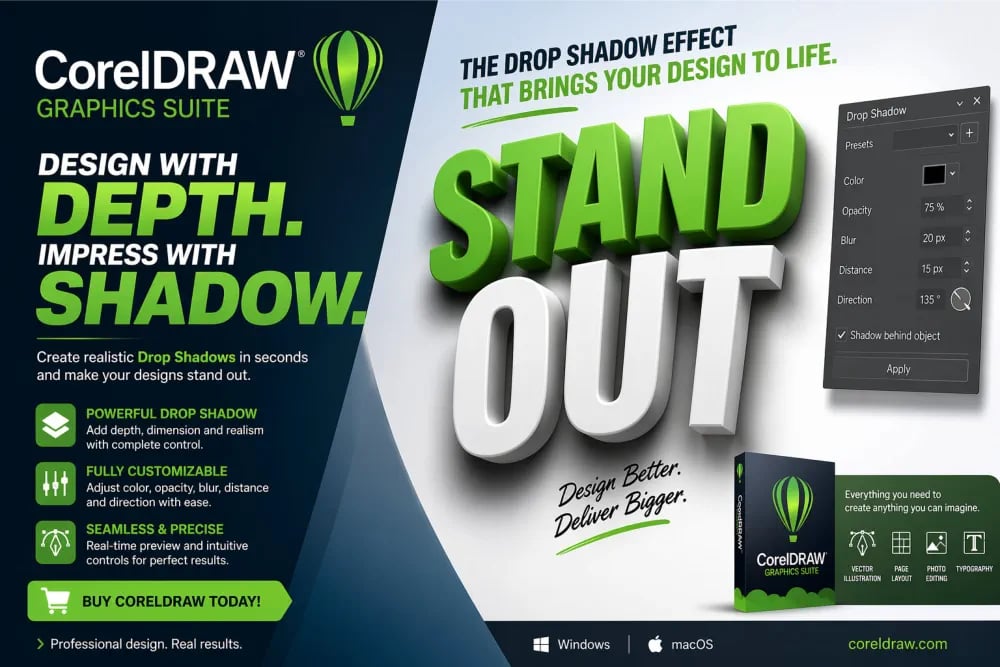
CorelDraw Drop Shadow Effect
Professional Graphic Design Software for Mac/Windows - Go beyond templates with CorelDRAW Go – Effortless online graphic design! Take your graphics projects further with more creative control than basic design apps provide
Why CorelDRAW Drop Shadow Effect Stand Out
The drop shadow effect in CorelDRAW Graphics Suite is more than just a visual enhancement; it is a powerful graphics design tool that instantly adds depth, realism, and professional polish to your artwork. With intuitive controls, designers can precisely adjust shadow opacity, blur, angle, and distance, transforming flat elements into striking, dimensional visuals that capture attention. Whether you're crafting logos, marketing banners, social media creatives, or print designs, CorelDRAW's drop shadow feature ensures your work stands out with cinematic clarity and impact. Real-time previews make graphics design experimentation effortless, allowing you to fine-tune every detail until perfection is achieved. From subtle shading to dramatic depth effects, this feature empowers both beginners and professionals to elevate their designs in seconds. If you want your graphics designs to look bold, modern, and visually compelling, the CorelDRAW drop shadow effect is the secret weapon that turns ordinary designs into extraordinary masterpieces.

The Power of Visual Depth in CorelDRAW Graphics Designs
In the world of digital design, where attention spans are short and competition is intense, visual impact is everything. The difference between a flat, forgettable design and a captivating masterpiece often lies in subtle enhancements, and one of the most powerful among them is the Drop Shadow effect. Within CorelDRAW Graphics Suite, the Drop Shadow tool is not just a decorative feature; it is a strategic design weapon that transforms ordinary graphics into compelling visual stories. Whether you're designing logos, advertisements, social media creatives, or print materials, mastering the Drop Shadow effect can dramatically elevate your graphics design work to the next level. CorelDRAW makes this process intuitive, flexible, and incredibly precise, allowing graphics designers of all levels to achieve professional-grade depth and realism. This feature bridges the gap between imagination and execution, helping your graphics designs stand out in crowded digital and print landscapes.
Understanding the Drop Shadow Effect in CorelDraw
At its core, the CorelDRAW Drop Shadow effect simulates the appearance of a shadow cast by an object when light falls on it. This simple concept introduces depth, perspective, and realism into flat 2D designs. In CorelDRAW, the Drop Shadow tool goes far beyond basic shadowing. It allows you to control direction, opacity, feathering, color, blur, and transparency with remarkable precision. This means you are not just adding a shadow; you are sculpting light. The effect can be subtle for elegance or bold for dramatic emphasis, depending on your design goals. By mimicking real-world lighting conditions, Drop Shadows create a sense of hierarchy, guiding the viewer’s eye to key elements. This is especially valuable in marketing materials where grabbing attention is crucial. CorelDRAW drop shadow effect empowers designers to fine-tune every aspect, ensuring that each shadow enhances rather than overwhelms the design.
Why Drop Shadows Matter in Modern Graphics Design
In today’s visually driven world, aesthetics play a critical role in communication. Drop Shadows are not just about style; they are about clarity and engagement. When used effectively in CorelDRAW, they help separate elements from backgrounds, making text more readable and objects more distinct. This is particularly useful in complex layouts where multiple elements compete for attention. A well-placed shadow can instantly highlight a call-to-action button or emphasize a brand logo. Moreover, Drop Shadows contribute to a polished, professional look that builds trust with your audience. In advertising, perception is everything. A design that looks refined and dimensional signals quality and credibility. CorelDRAW’s advanced Drop Shadow capabilities allow you to achieve this effortlessly, making your visuals not only attractive but also strategically effective in driving engagement and conversions.
Ease of Use: Designed for Every Skill Level
One of the standout features of CorelDRAW Graphics Suite is its user-friendly interface, and the Drop Shadow tool is no exception. Whether you are a beginner exploring design for the first time or a seasoned professional, the tool is intuitive and accessible. With simple drag-and-drop functionality, you can instantly apply shadows and adjust them in real time. The interactive controls make graphics design experimentation easy, allowing you to see changes as you make them. This eliminates guesswork and speeds up the design process. CorelDRAW also offers presets that serve as a starting point, helping beginners achieve professional results quickly. At the same time, advanced users can dive deeper into customization, tweaking every parameter of Drop Shadow Effect to perfection. This balance of simplicity and power makes CorelDRAW the ideal choice for anyone looking to enhance their graphics designs with Drop Shadow effects.
Customization in CorelDRAW gives total creative control
What truly sets CorelDRAW Graphics Suite apart is the level of customization it offers. The Drop Shadow tool is not a one-size-fits-all feature; it is a highly flexible system that adapts to your creative vision. You can control the angle and distance of the shadow to match your light source, adjust opacity for subtlety or boldness, and apply feathering to soften edges. Color customization allows you to move beyond traditional black or gray shadows, enabling creative effects like colored lighting or ambient glows. Transparency settings add another layer of realism, making shadows blend naturally with backgrounds. CorelDRAW also supports perspective shadows, which add depth by simulating how shadows behave in three-dimensional space. This level of control ensures that every shadow you create is unique and perfectly aligned with your design goals, giving you a competitive edge in professional graphics design work.
Enhancing Typography with Drop Shadows
Typography is a cornerstone of design, and Drop Shadow Effect can significantly enhance its impact. In CorelDRAW, adding a shadow to text can improve readability, especially when placed over complex or colorful backgrounds. It also adds a sense of depth, which makes headlines pop and body text more engaging. For branding and advertising, this can be a game-changer. Imagine a bold headline with a subtle shadow that draws the viewer’s eye instantly; this is the kind of visual hierarchy that drives results. CorelDRAW allows you to fine-tune the drop shadow effect, specifically for text, ensuring that they complement text, rather than overpower the typography. You can create soft, elegant shadows for a sophisticated look or sharp, dramatic ones for a bold statement. This versatility makes the Drop Shadow tool an essential asset for designers aiming to create impactful, readable, and visually appealing text elements and such other graphics designs.
Creating Realistic Graphics Designs with Depth
Flat design has its place, but realism often creates a stronger emotional connection. Drop Shadow effect in CorelDRAW help bridge this gap by adding depth and dimension to your graphics designs. Whether you are working on product mockups, digital illustrations, or marketing visuals, shadows make elements appear grounded and tangible. This is particularly important in eCommerce and advertising, where realistic visuals can influence purchasing decisions. CorelDRAW’s advanced drop shadow controls allow you to simulate natural lighting conditions, making your graphics designs look more lifelike. You can create soft shadows for a natural look or sharp ones for a studio-lit effect. The ability to adjust blur and transparency ensures that shadows blend seamlessly, enhancing realism without distracting from the main design. This capability transforms your work from simple graphics into immersive visual experiences that captivate and convince your audience.
Boosting Brand Identity with Professional Effects
Consistency and professionalism are key to building a strong brand identity. Drop Shadows in CorelDRAW can play a significant role in achieving this. By applying consistent shadow styles across your designs, you create a cohesive visual language that reinforces your brand. This is especially important for businesses that rely on visual marketing to communicate their message. A well-designed logo with a subtle shadow can appear more dynamic and memorable. Marketing materials with consistent depth and lighting effects look polished and trustworthy. CorelDRAW makes it easy to replicate and maintain these styles, ensuring that your brand visuals remain consistent across different platforms. This not only enhances recognition but also builds credibility, helping your brand stand out in a competitive market.
Time Efficiency and Workflow Optimization
In professional design environments, time is money.CorelDRAW Graphics Suite’s Drop Shadow tool is designed to streamline your workflow, allowing you to achieve stunning results efficiently. The real-time preview feature lets you see changes instantly, reducing the need for trial and error. Adjustable handles and interactive controls make it easy to fine-tune shadows without navigating complex menus. This speeds up the design process and allows you to focus on creativity rather than technical details. CorelDRAW also integrates seamlessly with other tools in the suite, enabling you to combine Drop Shadows with effects like transparency, gradients, and blends. This synergy enhances productivity and opens up new creative possibilities. Whether you are working on tight deadlines or large-scale projects, the efficiency of CorelDRAW ensures that you deliver high-quality graphics designs without compromising on speed.
Versatility Across Your Graphics Design Projects
One of the greatest strengths of the Drop Shadow effect in CorelDRAW is its versatility. It can be used across a wide range of design projects, from digital graphics to print materials. In web design, shadows add depth to buttons and interfaces, improving user experience. In print design, they enhance the visual appeal of brochures, posters, and business cards. For social media, Drop Shadows help your graphics design stand out in crowded feeds. CorelDRAW’s flexibility ensures that the effect adapts seamlessly to different mediums and styles. You can create subtle shadows for minimalist designs or bold ones for eye-catching visuals. This adaptability makes the Drop Shadow tool an indispensable part of any designer’s toolkit, enabling you to tackle diverse projects with confidence and creativity.
Competitive Advantage for Designers
In a competitive industry, having an edge is essential. Mastering the Drop Shadow effect in CorelDRAW gives you that advantage. It allows you to create designs that are not only visually appealing but also strategically effective. Clients and audiences are drawn to graphics designs that look polished and professional, and Drop Shadows play a key role in achieving this. By leveraging CorelDRAW’s advanced features, you can deliver high-quality work that stands out from the competition. This not only enhances your portfolio but also increases your value as a designer. Whether you are freelancing, working in an agency, or building your own brand, the ability to create impactful graphics designs quickly and efficiently can set you apart. CorelDRAW equips you with the tools you need to succeed in a fast-paced, visually driven market.
The Ultimate Graphics Design Upgrade
If you are looking to elevate your design game, the Drop Shadow effect in CorelDRAW Graphics Suite is a must-have tool. It combines simplicity with power, allowing you to create stunning visuals with ease. From enhancing typography to adding realistic depth, the possibilities are endless. CorelDRAW’s intuitive interface and advanced customization options make it accessible to beginners while offering the precision that professionals demand. This makes it more than just a graphics design tool; it is a creative powerhouse. Investing your time in mastering Drop Shadow effect within CorelDRAW is not just about learning a feature; it is about unlocking a new level of creativity and professionalism. In a world where first impressions matter, the drop shadow tool ensures that your graphics designs leave a lasting impact, helping you attract attention, engage audiences, and achieve your creative and business goals.